Entry Points
The installed command line entry point is orGUI. It calls
orgui.main:main and then starts either the normal Qt graphical user
interface (GUI) or the command-line interface (CLI) / headless startup path. In
both cases, the entry point prepares the runtime environment, loads the
requested orGUI configuration, creates the main orGUI application object, and
then either lets the user work interactively or runs a startup script passed
with -i.
Both modes create the same top-level orgui.app.orGUI.orGUI object. The
main difference is how the object is used: GUI mode shows the application for
interactive work, while CLI mode keeps the application available for scripts,
batch jobs, or an embedded command-line session.
Command Line
The usual startup forms are:
orGUI
orGUI examples/config_minimal
orGUI --cli examples/config_minimal
orGUI --cli examples/config_minimal -i startup_script.py
The optional positional argument is the orGUI configuration file. If it is not
given, orGUI uses ~/orgui when that file exists. If the default file does
not exist, orGUI starts without a preloaded configuration.
Useful options:
--cli,--nogui,--headlessStart the CLI path. A Qt application is still created, but
QT_QPA_PLATFORMis set tominimaland the main window is not shown.-i FILE,--input FILEExecute
FILEas a Python script after orGUI has been created. The script receives the variablesapp,orgui, andub. Unless--keep-runningis also given, orGUI exits when the script completes.--keep-runningKeep orGUI alive after an
-iscript finishes. In CLI mode this opens the embedded IPython shell after the script. In GUI mode the normal event loop continues.--cpus NSet
orgui.numberthreads. If omitted, orGUI checksSLURM_CPUS_ON_NODEandNSLOTSbefore falling back toos.cpu_count(), capped at 16.--logfile FILEand--errorlog FILEWrite INFO-and-above output or ERROR-and-above output to files. The console still receives log output.
--hdflocking/--no-hdflockingSet
HDF5_USE_FILE_LOCKINGonly when it is not already set in the environment. Disabling HDF5 file locking can avoid some shared-filesystem read problems, but can also risk file corruption if a process crashes.
GUI Mode
GUI mode is the default:
orGUI examples/config_minimal
Example GUI startup:
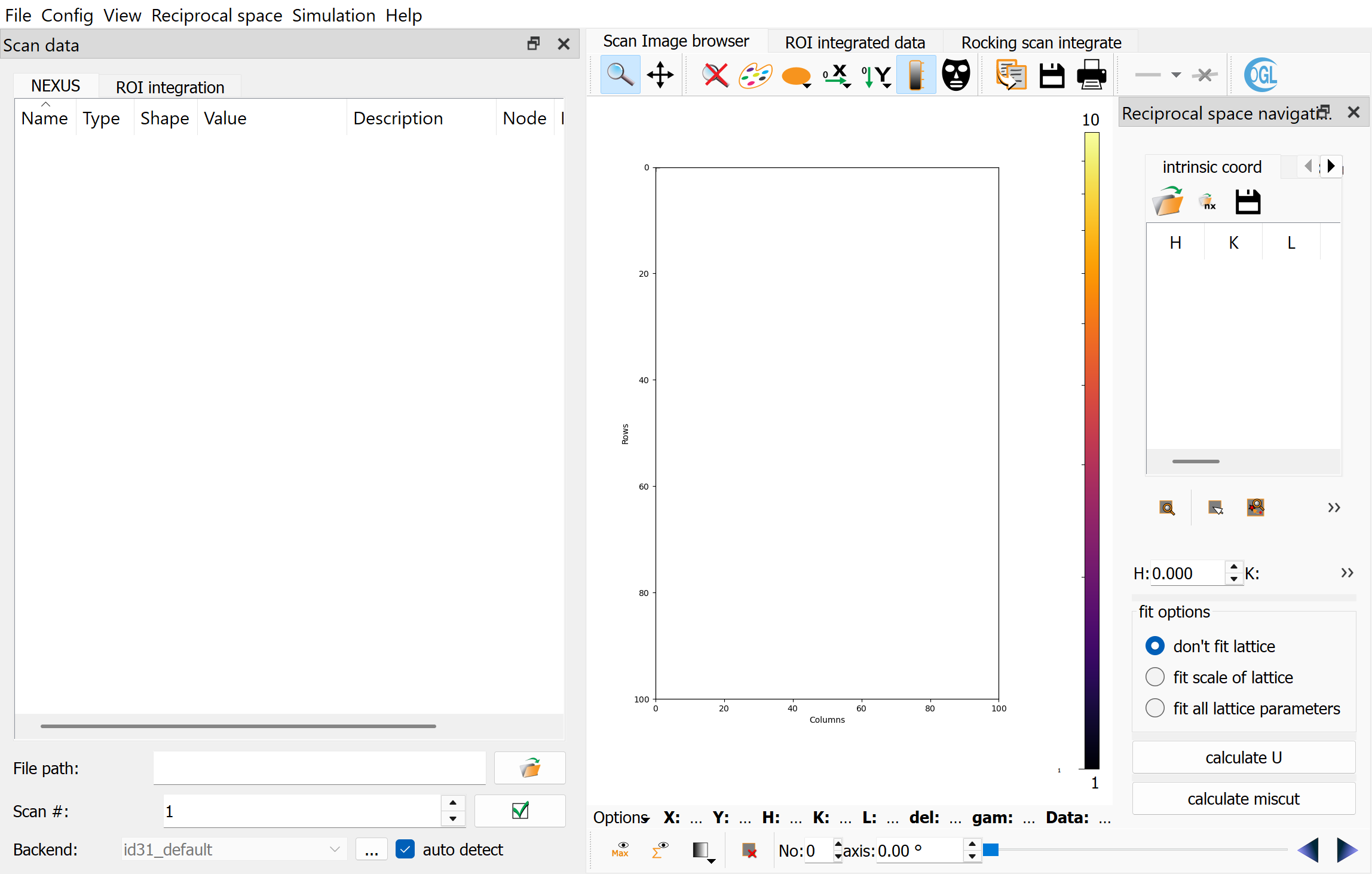
The startup path:
Creates the Qt application that drives the GUI and image/plot widgets.
Loads the CTR calculation modules and the main orGUI application.
Creates the main
orGUIwindow with the selected config file.Optionally executes the
-iscript withapp,orgui, andubin its global namespace.Enters the Qt event loop unless an
-iscript was run without--keep-running.
GUI startup is appropriate when the user will inspect images, set reference reflections, adjust ROIs, or interactively verify the setup before processing.
CLI Mode
CLI mode is selected with --cli, --nogui, or --headless:
orGUI --cli examples/config_minimal
The startup path:
Sets
QT_QPA_PLATFORM=minimal.Creates a
QApplicationand the same top-levelorGUIobject used by GUI mode.Creates an embedded IPython shell when no
-iscript is supplied, or when--keep-runningis supplied.Optionally executes the
-iscript withapp,orgui, andubin its global namespace.
CLI mode is not Qt-free. Scripts can use the same objects as the GUI, including widgets and actions, but they must not rely on blocking dialogs or user clicks. For batch processing, fully configure the scan, UB matrix, ROI settings, mask, and output database before calling integration methods.
Startup Script Namespace
An -i script is executed with these preloaded names:
appThe active
QApplication.orguiThe top-level
orGUImain-window object. This is the main scripting entry point for scan loading, database handling, reflection calculations, and ROI integration.uborgui.ubcalc, the UB matrix and angle calculator widget.
Because the startup script runs in the live application namespace, test scripts on a small scan first. Many useful operations are methods or widgets that are normally driven by GUI actions.
Example: Setup Function
A batch script should configure orGUI explicitly before processing data. A
useful pattern is to put all setup steps in a setup() function, then call
that function before any integration function. This keeps the script readable
and makes it easy to run setup alone in GUI mode for inspection.
The following setup() function loads a configuration, selects a scan file
and scan number, disables automatic max/sum image loading, applies a detector
mask, loads reference reflections, calculates the orientation matrix, and sets
common integration corrections.
Values shown here follow the normal orGUI conventions: energy in keV, wavelength in Angstrom when user-facing, detector distances and pixel sizes in meters in the config file, reciprocal-space coordinates in r.l.u., angles in degrees in the UI/config, and angles in radians in lower-level calculations.
import logging
from pathlib import Path

import fabio
import numpy as np

logger = logging.getLogger(__name__)

data_root = Path("/data/experiment/processed/sample_001")
configfile = data_root.parent / "config_sample"
specfilepath = Path("/data/experiment/raw/spec_file")

def setup():
    logger.info("Load orGUI configuration")
    orgui.ubcalc.readConfig(str(configfile))

    logger.info("Select scan source")
    orgui.scanSelector.pathedit.setText(str(specfilepath))
    orgui.autoLoadAct.setChecked(False)
    orgui.scanSelector.scannoBox.setValue(60)
    orgui.scanSelector._onLoadScan()

    logger.info("Load detector mask")
    with fabio.open(data_root / "mask.edf") as fabf:
        orgui.centralPlot.getMaskToolsDockWidget().setSelectionMask(fabf.data)

    logger.info("Load reference reflections and calculate UB")
    ref_refls = np.loadtxt(data_root / "scan60_Bragg.dat")
    orgui.reflectionSel.refleditor.updateArrayData(ref_refls)
    orgui.reflectionSel.refleditor.sigDataLoaded.emit()
    orgui.ubcalc.latfitall.setChecked(True)
    orgui.ubcalc._onCalcU()

    logger.info("Set default HKL line and ROI sizes")
    orgui.scanSelector.vsize.setValue(6)
    orgui.scanSelector.hsize.setValue(6)
    orgui.scanSelector.left.setValue(10)
    orgui.scanSelector.right.setValue(10)
    orgui.scanSelector.H_1[0].setValue(0.0)
    orgui.scanSelector.H_1[1].setValue(0.0)
    orgui.scanSelector.H_1[2].setValue(1.0)

    rocking_options = {
        "DetectorInclination": True,
        "ProjectSampleSize": True,
        "xoffset": 0.0,
        "yoffset": 0.0,
        "sizeX": 0.0005,
        "sizeY": 0.012,
        "sizeZ": 0.005,
        "factor": 1.0,
    }

    orgui.scanSelector.set_integration_options({
        "mask": True,
        "solidAngle": True,
        "polarization": True,
        "advanced": rocking_options,
    })


setup()
Run the setup script in GUI mode to inspect the result:
orGUI -i batch_sample.py --keep-running
Run it in CLI mode when the same setup is known to be reproducible:
orGUI --cli -i batch_sample.py --logfile setup_sample.log
Example: Batch Processing Script
The next example continues the same script. Put the integration code in a
separate function, such as process_ctrs(), and call setup() before it.
This guarantees that a script submitted with orGUI --cli -i batch_sample.py
loads the config, scan source, mask, reference reflections, UB matrix, and
integration options before processing.
The function loops over CTR scans and (H, K) rods, creates one Nexus output
file per rod, chooses an available Ewald-sphere intersection at L = 1,
integrates a rocking hklscan, and then runs a stationary hklscan for
the same rod.
def process_ctrs():
    ctr_scans = [60, 62, 64]
    rods_hk = np.loadtxt(data_root / "CTRs_available.txt").T[:2].T

    for scanno in ctr_scans:
        logger.info("Load scan %s", scanno)
        orgui.scanSelector.scannoBox.setValue(int(scanno))
        orgui.scanSelector._onLoadScan()

        orgui.scanSelector.autoROIVsize.setChecked(True)
        orgui.scanSelector.roscanMaxS.setValue(8.0)
        orgui.scanSelector.roscanDeltaS.setValue(0.002)

        outdir = data_root / str(scanno)
        outdir.mkdir(exist_ok=True)

        for i, hk in enumerate(rods_hk, start=1):
            h, k = [float(v) for v in hk]
            outfile = outdir / f"sample_{scanno}_{h:g}_{k:g}.h5"
            if outfile.exists():
                logger.info("Skip existing output %s", outfile)
                continue

            logger.info("Integrate %s/%s: H=%s K=%s", i, len(rods_hk), h, k)
            orgui.database.createNewDBFile(str(outfile))

            # Rocking hklscan tab. The HKL line is H_0 + s H_1 in r.l.u.
            orgui.scanSelector.scanstab.setCurrentIndex(2)
            orgui.scanSelector.vsize.setValue(10)
            orgui.scanSelector.hsize.setValue(10)
            orgui.scanSelector.left.setValue(10)
            orgui.scanSelector.right.setValue(10)

            refl = orgui.searchPixelCoordHKL([h, k, 1.0])
            if refl is None:
                logger.warning("No reflection calculation for H=%s K=%s", h, k)
                continue

            if refl["selectable_1"] and refl["angles_1"][1] < 0.0:
                orgui.scanSelector.intersS1Act.trigger()
            elif refl["selectable_2"] and refl["angles_2"][1] < 0.0:
                orgui.scanSelector.intersS2Act.trigger()
            else:
                logger.warning("No usable negative-delta intersection")
                continue

            orgui.scanSelector.ro_H_0_dialog.set_hkl([h, k, 0.0])
            orgui.scanSelector.ro_H_1_dialog.set_hkl([0.0, 0.0, 1.0])
            orgui.integrateROI()

            # Stationary hklscan tab for the same rod.
            orgui.scanSelector.scanstab.setCurrentIndex(0)
            orgui.scanSelector.H_0[0].setValue(h)
            orgui.scanSelector.H_0[1].setValue(k)
            orgui.scanSelector.H_0[2].setValue(0.0)
            orgui.scanSelector.H_1[0].setValue(0.0)
            orgui.scanSelector.H_1[1].setValue(0.0)
            orgui.scanSelector.H_1[2].setValue(1.0)
            orgui.integrateROI()


setup()
process_ctrs()
Run it with:
orGUI --cli -i batch_sample.py --cpus 8 \
    --logfile process_ctrs.log --errorlog process_ctrs_errors.log
Example: Cluster Array Processing
For SGE-style array jobs, split the list of rods by environment variables and
let each task process a different subset. This keeps one orGUI process per
array task and avoids concurrent writes to the same Nexus output file.
import os

import numpy as np

first = int(os.environ.get("SGE_TASK_FIRST", "1"))
task_id = int(os.environ.get("SGE_TASK_ID", "1"))
last = int(os.environ.get("SGE_TASK_LAST", "1"))

task_count = last - first + 1
task_index = task_id - first

rods_hk = np.loadtxt("CTRs_available.txt").T[:2].T
rods_for_this_task = np.array_split(rods_hk, task_count)[task_index]

for h, k in rods_for_this_task:
    # Use the same scan loading, database creation, intersection selection,
    # and orgui.integrateROI() calls as in the batch example above.
    ...
Submit with a command similar to:
orGUI --cli config_sample -i process_array_task.py --cpus 8 \
    --logfile "integr_${SGE_TASK_ID}.log"
Batch Processing Notes
Create a new output database with
orgui.database.createNewDBFile()before integration when each rod or scan should be written to a separate file.orgui.searchPixelCoordHKL([H, K, L])returns angles in radians and detector positions in pixels. Theselectable_1andselectable_2flags indicate whether each solution falls on the detector.orgui.integrateROI()uses the active integration tab and current widget state. Setorgui.scanSelector.scanstabbefore calling it.In CLI mode, logging an
ERRORthrough theorguilogger raises an exception. UseWARNINGfor recoverable per-rod failures.Avoid writing the same HDF5/Nexus file from multiple processes. Use one file per task or otherwise coordinate writes outside orGUI.